
After a power outage, most garage door openers reset automatically when power is restored. If the door does not respond, the opener has been manually disengaged, or the settings have been lost, a few straightforward steps reconnect and restore normal operation.
What Happens to a Garage Door Opener During a Power Outage?
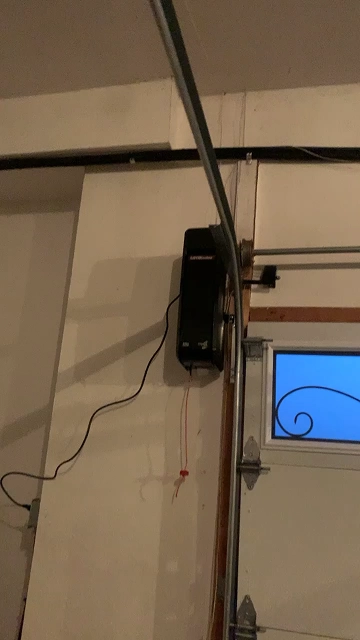
When power is cut to a garage door opener, the motor unit stops and the door becomes stationary wherever it was in its travel cycle. If the door was closed when the outage occurred, it stays closed. If it was open, it stays open. The opener logic board retains its programming in most modern units through a non-volatile memory chip, so remote pairings, limit settings, and security codes are not lost during a standard outage.
Smart openers connected to WiFi will lose their network connection during the outage and will need to reconnect to the router when power returns, which typically happens automatically within a few seconds. Legacy Garage Doors installs and configures smart garage doors across the GTA and can assist with reconnection issues specific to myQ and similar platforms.
What to Do Immediately During a Power Outage
If the power goes out while the door is in motion, the opener stops. Do not attempt to force the door manually while the opener is still connected to the drive. Wait until you have confirmed the opener has power or has been manually disengaged before moving the door.
If you need to open or close the door during the outage, use the emergency release cord as described in the manual open guide. For full instructions on safely operating the door by hand during a power failure, review the how-to-manually-open resource. If the spring system shows any signs of damage, contact Legacy Garage Doors rather than attempting a manual open.
How to Reset the Garage Door Opener After Power Returns
Step One: Confirm Power Has Been Restored
Check that the opener motor unit indicator light is on and that the wall button panel is lit. If the unit has no power after the outage has ended, check the circuit breaker or the outlet the opener is plugged into. Garage door opener outlets are sometimes on a GFCI circuit that can trip during a power surge associated with the outage restoration.
Step Two: Re-Engage the Opener if Manually Released
If the emergency release cord was pulled during the outage, the door needs to be reconnected to the opener drive. With the door in the fully closed position, either operate the opener using the wall button or remote to drive the trolley back along the rail to re-engage the carriage, or manually slide the door toward the opener and push the carriage back until it clicks into the drive.
Step Three: Test the Wall Button
Press the wall button to confirm the opener responds and the door moves through a full cycle. If the button is unresponsive, check the wiring between the wall button and the motor unit for any loose connections that may have been disturbed during the outage.
Step Four: Test Remotes and Keypads
Test each remote and keypad to confirm they operate the door correctly. In most cases these will function normally after power restoration without any reprogramming. If a remote does not respond, replace its battery first before assuming the pairing has been lost.
Step Five: Reconnect Smart Opener to WiFi
If you have a WiFi-enabled smart opener such as a LiftMaster with myQ, open the app and confirm the opener shows as connected. Most units reconnect automatically within 30 to 60 seconds of power restoration. If the unit shows offline after two minutes, restart the router and wait for it to fully reconnect before checking the opener app again. Persistent connectivity issues with smart openers are covered by Legacy Garage Doors’ smart garage door service.
What If the Opener Does Not Work After Power Is Restored?
If the opener has power but does not respond to the wall button or remote after all the steps above, the logic board may have been damaged by a power surge during the outage. Power surges during utility restoration are a common cause of electronic component damage in garage door openers. Surge protectors on the outlet the opener is plugged into reduce this risk.
A logic board damaged by a power surge cannot be reset by the homeowner. The opener requires professional assessment to determine whether the board can be replaced or whether full opener replacement is the more cost-effective resolution. Legacy Garage Doors diagnoses opener faults caused by power events through the opener replacement service.
How to Protect Your Garage Door Opener from Future Power Events
- Install a surge protector on the outlet powering the opener. A standard 15-amp surge protector rated for electronics protects the logic board from voltage spikes during restoration.
- Consider an opener with a built-in battery backup. LiftMaster and Chamberlain offer battery backup units that continue to operate the door for up to 20 cycles during an outage. This eliminates the need for manual release and reconnection entirely.
Battery backup openers are available through Legacy Garage Doors’ opener replacement service and are a practical upgrade for GTA homeowners in areas with frequent short outages such as those caused by ice storms or summer thunderstorms, both of which are common in the Ontario weather pattern.
Hydro One outage data for Ontario confirms that the GTA experiences a significant number of weather-related outages annually, making battery backup a practical investment rather than a luxury for many homeowners.
When Should You Call a Professional After a Power Outage?
Call Legacy Garage Doors if: the opener has power but will not respond to the wall button or remote after steps one through five, the door was in motion when the outage occurred and is now stuck mid-travel, the door makes unusual sounds when attempting to operate after power restoration, or you pulled the emergency release cord and the door will not reconnect to the drive. Contact Legacy Garage Doors for same-day diagnosis and repair across the GTA.
Frequently Asked Questions
1. Why does my garage door opener flash but not respond after the power came back?
A flashing light on the motor unit without movement indicates the unit has power but is not executing a command. The most common causes after a power outage are a manually disengaged drive (emergency release still pulled), a tripped internal fault code, or a damaged logic board. Check that the emergency release is re-engaged first. If the door is connected and the unit still will not operate, the Legacy Garage Doors team can provide a full diagnosis.
2. Do I need to reprogram my garage door opener after a power outage?
In most cases, no. Modern openers store remote pairings and settings in non-volatile memory that is not affected by power loss. If a remote fails to operate after power restoration, replace its battery first. If the battery is fresh and the remote still does not work, the pairing may need to be refreshed. The LiftMaster and Chamberlain comparison covers key differences between these opener systems.
3. My garage door got stuck open during a power outage. How do I close it?
Pull the emergency release cord and guide the door down by hand to the closed position. Secure it with the interior locking bar or a padlock through the release bracket while power is out. Once power is restored, re-engage the opener drive and test normal operation. If the door is too heavy to lower by hand, a spring or cable failure may be present. Contact Legacy Garage Doors for emergency service.
4. Will a power surge damage my garage door opener?
Yes. Power surges during utility restoration can damage the logic board in a garage door opener. Symptoms of surge damage include the unit having power but not responding to commands, error lights that cannot be cleared, and intermittent operation. Installing a surge protector on the opener outlet is the most cost-effective protection. Units with damaged logic boards typically require professional assessment for board replacement or full opener replacement. Learn more about malfunctioning openers and what the symptoms mean.
5. Can I install a battery backup on my existing garage door opener?
Battery backup capability is built into specific opener models and generally cannot be added to existing units that were not designed for it. Upgrading to a battery backup opener typically requires replacing the current unit. Legacy Garage Doors supplies and installs battery backup openers from LiftMaster and Chamberlain through the opener replacement service.
Key Takeaways
- Most modern openers restore automatically after a power outage without requiring reprogramming. Remote pairings are stored in non-volatile memory.
- If the emergency release cord was pulled during the outage, the door must be reconnected to the opener drive before the motor can operate it.
- GFCI outlets and circuit breakers associated with the opener circuit can trip during power restoration and should be checked if the unit has no power.
- Power surges during restoration can damage logic boards. A surge protector on the opener outlet is a low-cost preventive measure.
- Battery backup openers eliminate the need for manual release and reconnection during outages and are a practical upgrade for GTA homeowners.
- Call Legacy Garage Doors if the opener has power but will not respond, the door is stuck mid-travel, or unusual sounds are present after restoration.